
How the company exchange rate, the quote currency and saved rates keep your numbers consistent from cost to PDF.
· 6 min read, by the Quest team
Ugandan safari costs live in two currencies. Park fees and many lodge rates are in US dollars. Fuel, local services and some payments are in shillings. A quote has to bridge the two without introducing errors, and without the rate shifting under you after the tourist has seen a number.
One company rate
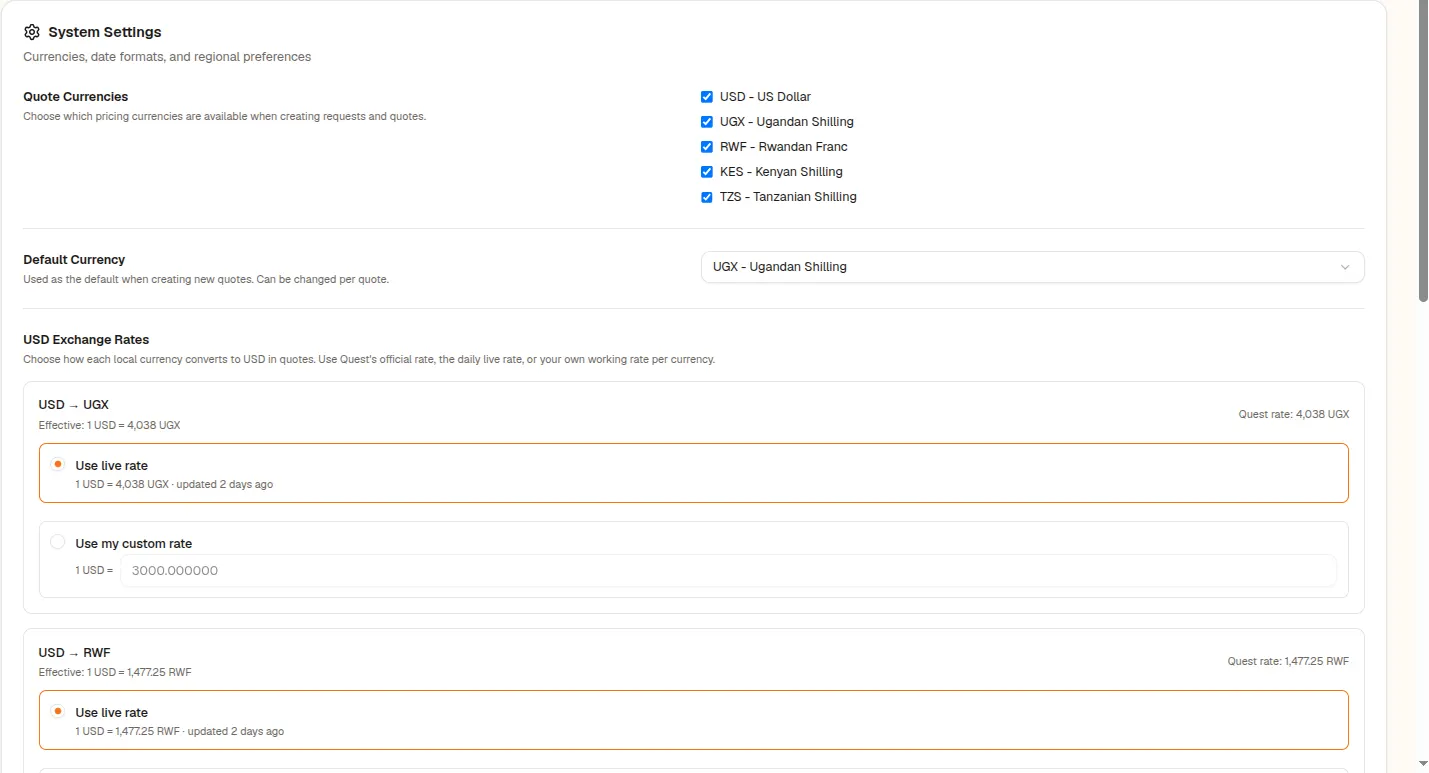
Quest converts between USD and UGX using a company-level rate. In company system settings you choose either the live rate, fetched daily from Open Exchange Rates, or a custom rate, for example your bank's working rate with a buffer. You can refresh the live rate manually, up to once an hour. The effective rate is displayed as 1 USD equals so many UGX.
A currency for each quote
Each quote has a quote currency, the one your tourist will see. Cost summaries convert stored amounts into it, so the group and individual summaries match the quote. Company settings also let you pick the currencies you work in and a default currency.
Rates are saved with the quote
When a number depends on the rate, such as transport fuel, Quest stores the rate used on the line. Draft itineraries refresh live rates when you open them, while sent and confirmed items keep their locked rate, so a booking confirmation matches what the tourist agreed.
See the full picture in cost reports, and learn how seasonal prices combine with currency in a single quote.
About this feature
Multi-Currency
Cost in shillings, quote in the currency your tourist understands.
Explore Multi-Currency