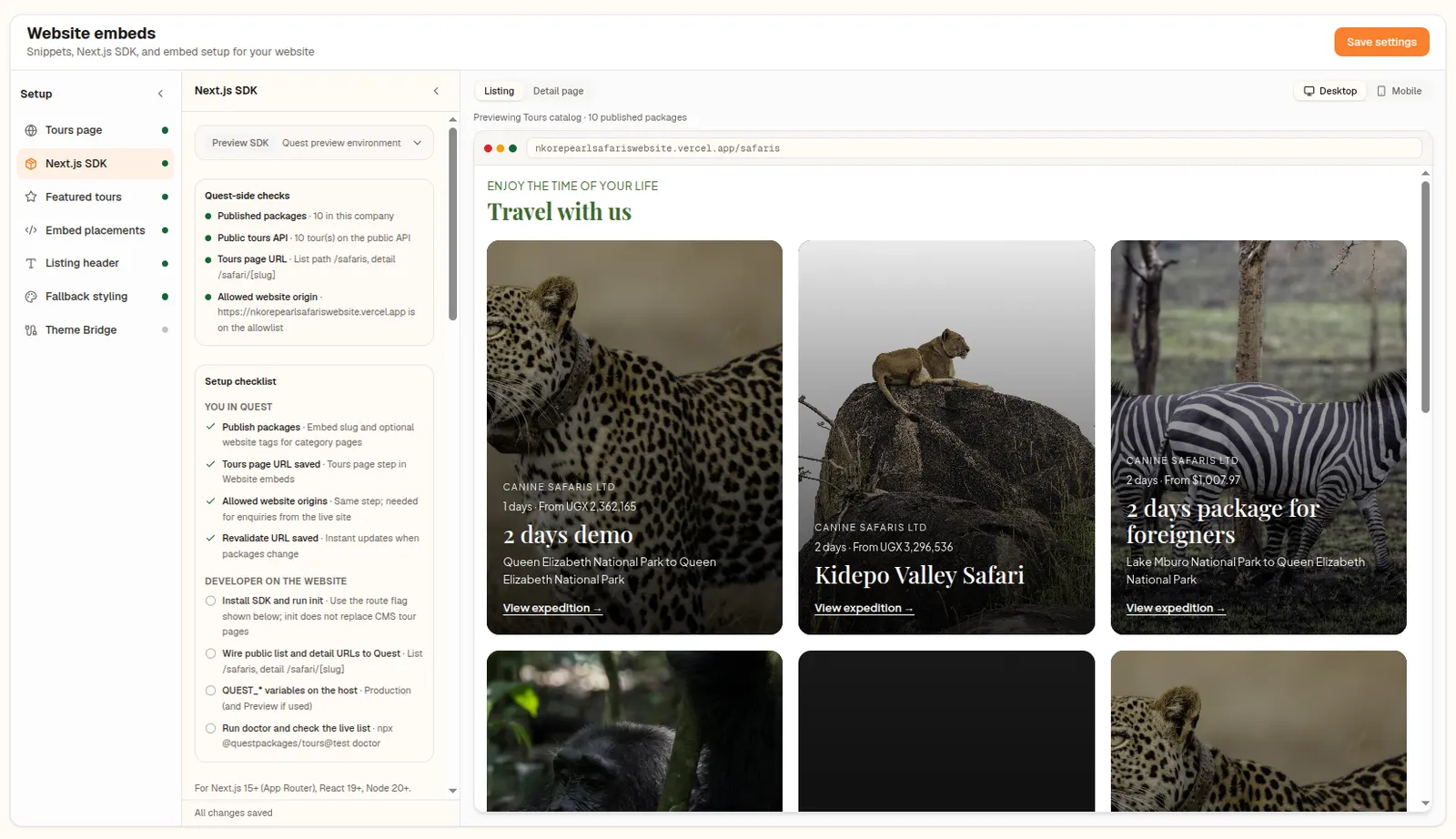
The @questpackages/tours SDK renders styled tour cards and detail pages on your own Next.js site, with the same inquiry and booking forms as the embed.
What it does
For coded websites, the Quest SDK is the recommended route. Tours render on your own server, so search engines see real content, and there is no iframe. You get styled defaults and typed data from a public tours API scoped to your company's site token.
When you change a package in Quest, a signed webhook tells your site to refresh the affected pages within seconds. Setup lives in Website embeds under the Next.js SDK step, with an install command, a revalidate URL, a webhook secret and an agent brief.
Why operators use it
- 01
Server-rendered for SEO
Tour pages are rendered on your server, so they are fully visible to search engines.
- 02
Fresh within seconds
A signed webhook refreshes your tour pages when you edit a package.
- 03
Typed and styled
Typed data and default components get you to a working tours page quickly.
How it works
Install the package
Run the install command shown in Website embeds.
Initialise
Run the init command with your site token.
Connect the webhook
Add the revalidate URL and secret so changes sync.
FAQ
Common questions about quest sdk.
The SDK is built for Next.js App Router sites. Other frameworks can use the web component.